Author: oowoah

  • Could Football Clubs Offer Virtual Season Tickets?

    Could Football Clubs Offer Virtual Season Tickets?

    A virtual season ticket is an appealing idea: one purchase giving a remote supporter access to an agreed set of fixtures. Before a club offers one, it needs to establish both the broadcasting arrangements and how the package would actually be delivered.

    A programme of individual authorised events does not automatically create a supported season-pass product. The club should confirm the required ticketing and access arrangements with OowOah.

    Define what the package would cover

    Which home matches are included? What happens if kick-off changes, a fixture is postponed or a cup match falls outside the package? Would recordings be available, and for how long?

    Those questions are part of the product supporters would buy. They need clear answers before a season-long promise is made.

    Learn from single events first

    An initial run of separate broadcasts could reveal whether the club has a consistent viewpoint, dependable staffing and repeat interest. It also gives supporters a chance to decide whether they enjoy watching in a headset.

    Only then does a longer package become a practical discussion. The commercial plan should allow for the work involved across the whole period, rather than multiplying the ticket price from one successful afternoon.

    For OowOah, this is a potential package to discuss and scope. It is not an announcement that automatic season passes, bundled fixtures or subscription billing are currently available as standard features.

    Explore the next step

    info@oowoah.com

  • Where Should a 360° Camera Be Positioned at a Football Ground?

    Where Should a 360° Camera Be Positioned at a Football Ground?

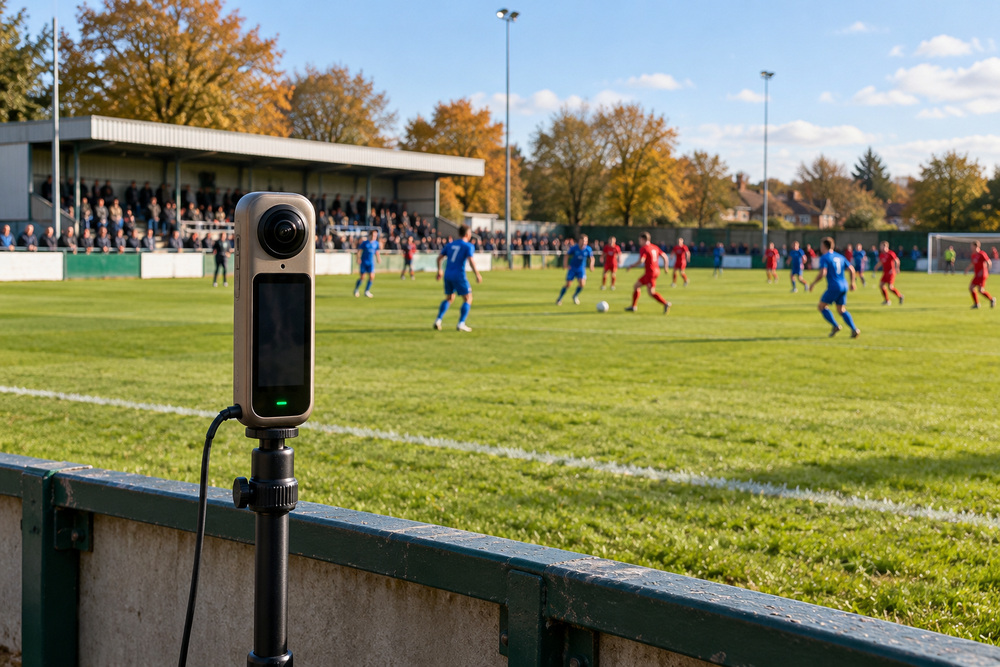
    The position of a 360° camera determines where a remote spectator feels located. It also determines what they can see. At a football ground, those two considerations need to work together.

    A spot near enthusiastic supporters may convey atmosphere, while a more open, raised position may make the game easier to follow. Neither should be chosen only because it looks good in a photograph.

    Follow the whole pitch

    Test the near and far touchlines, both goals and the areas where players gather. Check whether barriers, dugouts, standing spectators or advertising boards obstruct the view. Think about what changes after the ground fills up.

    A fixed camera does not follow the ball with the zoom and movement of a television camera. Supporters should be able to understand the proposed experience before booking it.

    Plan for the people using the ground

    The installation should remain clear of play, officials and access routes. Discuss mounting and protection with the club and venue team, particularly where weather or a stray ball could affect equipment.

    Sound deserves a location test too. A loudspeaker beside the camera or strong wind might dominate the recording even if the picture looks attractive.

    For a potential OowOah broadcast, compare candidate positions through the actual headset experience. A short trial with someone outside the ground can reveal problems that are easy to miss while standing beside the camera.

    Explore the next step

    info@oowoah.com

  • Could Fans Who Cannot Travel Still Experience Match Day?

    Could Fans Who Cannot Travel Still Experience Match Day?

    There are many reasons a supporter may be unable to travel: distance, caring responsibilities, time or difficulty getting to the ground. A remote match-day experience could offer another choice for people who still want to feel connected to their club.

    A 360° broadcast would give a compatible headset user a viewpoint within the real setting. They could look around from the camera’s position rather than follow only the picture selected for a conventional screen.

    Offer another choice without assuming everyone can use it

    VR itself will not suit every supporter. Headset comfort, vision, hearing and confidence with technology vary. A club should describe what the experience involves so people can decide whether it is appropriate for them.

    Consider a seated demonstration before asking someone to buy a ticket. Explain the required equipment, the length of the broadcast and how to leave the experience if they want a break.

    Make the joining information practical

    Clear instructions matter as much as the attraction of the match. Tell viewers which account to use, when to prepare and where to ask for help. Any replay or alternative viewing option should be stated explicitly if offered.

    For OowOah, sports broadcasting is an application to explore with an organiser. The useful question is how a particular club could create a worthwhile remote experience for its supporters, with realistic information about both the opportunity and the equipment needed.

    Explore the next step

    info@oowoah.com

  • What Would a Football Club Need to Stream Matches in VR?

    What Would a Football Club Need to Stream Matches in VR?

    A football club interested in live VR needs a plan covering the event, the equipment and the audience. Buying a 360° camera is one part of that conversation; it does not decide whether a match can be broadcast or whether the view will work.

    Start by agreeing which fixture or demonstration is being considered and who can authorise the coverage. Then discuss its suitability with OowOah before promoting tickets.

    Prepare the ground and connection

    The camera needs an approved position, a stable mounting arrangement and a clear view. The team should consider power, weather protection and safe cable routes. A connection test should cover sustained upload performance at the venue under realistic match-day conditions.

    Someone also needs responsibility for the event setup and for checking that the broadcast has started correctly. Make sure the club knows who will respond if the feed is interrupted.

    Prepare the remote spectator

    Viewers need compatible headset equipment, internet access and the OowOah viewing arrangements applicable to the event. Explain those requirements on the event page before booking.

    A complete trial should include the audience journey as well as the camera: finding the event, booking, signing in and entering from outside the venue. Watch long enough to assess the actual view and sound.

    A sensible first project is one the club can test and describe clearly. Confirm the current setup with OowOah rather than assuming that any camera or existing club livestream will work unchanged.

    Explore the next step

    info@oowoah.com

  • Could Local Football Clubs Sell Virtual Match Tickets?

    Could Local Football Clubs Sell Virtual Match Tickets?

    A local football club can have supporters far beyond the people standing beside its pitch. Former residents, travelling workers and fans living abroad may still want to follow the team. A virtual match ticket could give them another way to take part.

    For a suitable, authorised event, OowOah Live VR could provide the platform for a 360° viewing experience. The club would need to define exactly what its remote ticket includes.

    Give the ticket a clear purpose

    A supporter should know whether they are buying access to the match alone or a wider programme. State the camera viewpoint, broadcast start time and whether commentary or replay access is included. Do not imply that extra features are automatic.

    Begin with a single fixture or controlled demonstration rather than assuming demand for a full season. Ask interested supporters whether they own a compatible headset and would pay for the proposed experience.

    Consider the work as well as the opportunity

    A club still needs equipment, a suitable connection, someone responsible for the broadcast and a way to answer access questions. Those costs and responsibilities belong in the plan alongside ticket income.

    OowOah’s stated Live VR service charge is 15% of ticket sales. A club should confirm the full commercial arrangement and its own costs before setting a price.

    Virtual tickets are an idea to investigate, not a forecast of guaranteed additional income. The strongest starting point is an audience the club already understands and a viewing experience it has tested.

    Explore the next step

    info@oowoah.com

  • Could Supporters Abroad Stay Connected to Their Home Club Through VR?

    Could Supporters Abroad Stay Connected to Their Home Club Through VR?

    Moving abroad does not necessarily mean losing interest in the club you grew up following. For some supporters, the missing part is not the score but the familiar ground, voices and feeling of being there on a Saturday afternoon.

    An authorised live VR broadcast could explore that connection. From a selected camera position, a remote spectator could look towards the pitch and around the match-day setting through a compatible headset.

    Make distance part of the event plan

    A club considering overseas viewers should explain kick-off times clearly, including the UK time zone. Supporters may also want to know when entry opens and whether they can test their setup before the fixture.

    Do not assume that a person who follows the club online already has the required headset. An early expression-of-interest form could ask where supporters live, what equipment they have and which fixtures they would realistically watch.

    Keep the connection personal

    The most interesting pitch may be the club itself: the small stand, the crowd’s reaction and a recognisable local setting. There is no need to promise the production style of an international television broadcast.

    OowOah Live VR could be discussed as a possible delivery route, subject to event suitability and permissions. Availability in a particular country would need checking against the event’s arrangements. A supporter overseas should know what they can book before money changes hands.

    Explore the next step

    info@oowoah.com

  • Could You Watch a Live Football Match in VR from Home?

    Could You Watch a Live Football Match in VR from Home?

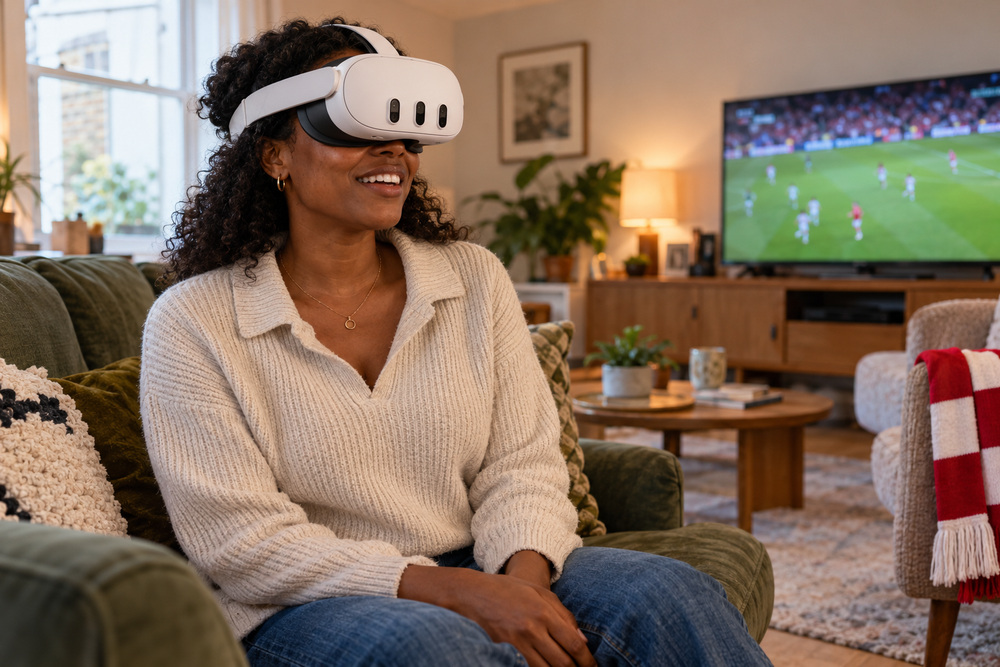
    Imagine settling into your sofa and looking towards the corner flag as the crowd reacts around you. A live 360° football broadcast could offer a different sense of match day from the familiar view on a television.

    The idea for OowOah Live VR is straightforward: an authorised camera position at the ground would become the remote spectator’s viewpoint. A supporter wearing a compatible Meta Quest headset could turn their head to explore the surroundings while play continues.

    What would you actually see?

    Your position would be determined by the camera. Looking around is different from walking around the stadium or choosing any seat you like. The distance to the far goal, nearby spectators and the height of the camera would all affect the experience.

    A useful pilot would test whether supporters can follow the ball across the whole pitch. A dramatic pitchside view may feel close to the action while making distant play harder to see. The right choice needs a headset test during realistic conditions.

    A new option for following your club

    For supporters who cannot get to the ground, that surrounding atmosphere could be the attraction. The event description should explain the viewpoint and any commentary, rather than promising a television production with several cameras.

    Football is a potential application to discuss with OowOah. A club would need the appropriate streaming permissions and an agreed technical plan before a fixture could be offered to viewers. No particular match is being announced here.

    Explore the next step

    info@oowoah.com

  • Could a 360° Camera Give Football Fans a Pitchside View?

    Could a 360° Camera Give Football Fans a Pitchside View?

    Pitchside football has its own rhythm: players warming up nearby, instructions from the technical area and the crowd responding to a challenge. A 360° camera could capture that setting from a position selected for remote spectators.

    For OowOah Live VR, the opportunity is to let a headset viewer look around from that real position. The camera does not need to pretend it is a player, and the spectator would remain outside the game.

    Close to the pitch, with a useful view

    Being close is only valuable if the view works. A low camera beside advertising boards may lose sight of play when someone walks past. A position near the halfway line may help with the overall game but still leave the far side distant.

    The club and production team should compare possible locations before choosing one. Check barriers, substitutes, weather protection, sound and how equipment can remain clear of players and officials.

    Test the experience supporters will receive

    A trial should use the actual headset view. Ask a tester to follow a period of play, turn towards the spectators and describe what is easy or difficult to see.

    That feedback gives the club something practical to work with. The aim is an engaging match-day viewpoint that can be described honestly on the booking page. A camera location would still need the ground’s approval and any necessary competition or broadcasting permission.

    Explore the next step

    info@oowoah.com

  • What Would You Put on Your Experience Bucket List?

    What Would You Put on Your Experience Bucket List?

    A bucket list can become a catalogue of expensive journeys. It does not have to. An experience worth remembering might be hearing a favourite piece of music live, learning a small skill or seeing somewhere familiar from a different angle.

    Start with the feeling you want

    Are you looking for excitement, curiosity, calm or time with somebody you care about? Answering that can make the list more personal. A fashionable destination is not automatically the right experience for you.

    Include something you can actually do soon

    Add a local performance, a workshop or a guided walk alongside the bigger ambitions. Give each idea a practical next step and an approximate budget. A list becomes more useful when it helps you choose an evening rather than merely admire an impossible itinerary.

    Try a subject before committing to the journey

    A remote talk, tour or demonstration may help you explore an interest. It can also be an enjoyable event in its own right. Be clear about what you value: seeing a place through a camera is a different experience from visiting it physically.

    Leave space for surprises

    You do not need to optimise every weekend into an achievement. A friend’s invitation or a small local event may become a favourite memory. The list should give you ideas, not turn enjoyment into another set of deadlines.

    Curious about bringing people together remotely? Explore Live VR Events with OowOah.

  • How Can a VR Meeting Help a Team Compare Two Design Options?

    How Can a VR Meeting Help a Team Compare Two Design Options?

    A VR meeting can help a team compare two design options when the discussion is organised around clear material and an agreed decision. The shared environment gives participants a place to review the same information, but it does not decide which proposal is better. OowOah VR Meeting Rooms provide presentation screens and a setting for discussion. The useful work begins with choosing what people need to see and which differences they should evaluate. ## Present the same information for both options Prepare each proposal at a comparable level of detail. If one has polished images and the other has only a rough description, the group may respond to presentation quality rather than the underlying choice. Use consistent headings, scales and labels so participants can follow the comparison without repeatedly asking what they are looking at.

    For an illustrative office-layout discussion, show the intended use, relevant constraints and practical consequences for each option. Clearly identify the version and date of each document. Sharing a drawing on a virtual screen is different from providing an interactive model, so describe the material and format accurately when preparing the meeting. ## Agree the criteria before discussing preferences Ask what the decision needs to achieve. A proposal might need to support a workflow, fit an available area or stay within an agreed resource limit. List those criteria before people become attached to one image. This creates a common reference point for the discussion rather than a series of unrelated personal reactions.

    Separate essential requirements from desirable features. A visually appealing option may still fail a necessary constraint. Conversely, a less dramatic proposal may satisfy the main purpose more clearly. The meeting becomes easier to follow when participants can explain which criterion supports their view instead of simply saying that one design feels better. ## Give each option uninterrupted attention Introduce the first proposal, allow clarification questions and summarise its main points before moving on. Repeat the process for the second. This does not prevent comparison; it gives each option a fair explanation first. Constantly switching between documents before anyone understands either can make a shared presentation unnecessarily difficult.

    Use clear spoken references when directing attention to a screen. Name the drawing, the area or the relevant line rather than saying only over there. Participants may be looking at different parts of the room or may have missed the previous reference. Good facilitation remains important inside a shared virtual space. ## Record questions separately from conclusions Some differences can be discussed immediately; others require information that is not available. Keep a clear list of unanswered questions and assign responsibility for finding the answers. An assumption should not become a confirmed fact simply because several people repeated it during the meeting. State where the evidence is incomplete.

    OowOah's published meeting information includes notes, transcripts and recording features. Agree how your organisation will use those tools, then review any summary before relying on it as a decision record. A useful note identifies the chosen option, the reasons, any conditions and the person responsible for the next action. ## Finish with a decision or a defined next step If the evidence is sufficient, confirm what has been agreed and who can authorise it. If it is not, identify the smallest amount of additional work needed. That is more useful than scheduling another general discussion with the same unresolved questions. A short follow-up can then address the actual gap.

    Explore OowOah VR Meeting Rooms for the current presentation and collaboration information. For a demonstration, describe the type of material your team needs to compare and the decision you want to make. The strongest use of the room is a well-prepared discussion with a clear result.

    Explore the next step

    What Should You Put on the Shared Screen Before a VR Decision Meeting?

    For a project review involving a real location, explore Quantum Leap’s first-person viewing approach alongside the meeting-room information.

    Discuss your plans through OowOah’s contact page or email info@oowoah.com.

  • How Can You Rehearse a Live VR Event Before Inviting Your Audience?

    How Can You Rehearse a Live VR Event Before Inviting Your Audience?

    A rehearsal for a Live VR event should test the experience the remote audience will actually receive. It is different from checking that the speaker knows their slides or that a camera powers on. OowOah Live VR is designed to let headset viewers look around a real event through a compatible 360° camera. A useful rehearsal follows the path from the venue's preparation to a test viewer's experience, then records what needs changing. ## Rehearse a short representative section Choose a section that includes the main ingredients of the event: an introduction, ordinary speech, any presentation material and a transition. A quiet test in an empty room may miss problems that appear when the speaker moves or other people are present. The rehearsal should resemble the intended event closely enough to reveal practical issues.

    For an illustrative seminar, test a few minutes of presentation followed by a question from the room. That gives you more useful information than a camera view with nobody speaking. The aim is to identify the weakest part of the experience before a paying or invited audience depends on it, not to stage the entire event twice. ## Include somebody watching through a headset Ask a tester to follow the viewing route agreed for the rehearsal. The venue team can see that equipment is running while the remote experience remains difficult to follow. A headset viewer can describe what is visible, how comfortably the scene can be understood and whether the sound carries the main content.

    Give the tester specific questions rather than asking only whether it looks good. Can they follow the speaker? Do important details disappear when someone stands near the camera? Is a change of activity understandable without the physical programme? Specific feedback makes it easier to identify a useful adjustment instead of receiving a general compliment. ## Check speech and audience questions separately The speaker's microphone may sound clear while questions from the venue are difficult to hear remotely. Include both in the rehearsal. Agree how a host will repeat or summarise a question where needed. Remote viewers should not have to infer the discussion from an answer to something they never heard.

    Consider presentation material too. A projected slide visible to the venue audience may not be readable from the chosen camera position. Test the actual material rather than assuming that any large screen will work equally well in the stream. Adjust the presentation or supply another agreed route to supporting information when necessary. ## Practise transitions and recovery communication Rehearse the opening, a speaker change and the end. Explain what the remote audience should expect during a pause. If an interruption occurs, identify who communicates an update and through which available channel. This is an event plan, not a claim that the platform automatically creates every backup route you might want.

    Keep responsibilities clear. One person might lead the programme while another checks the broadcast and receives the tester's feedback. Confirm the current technical setup with OowOah before making promises in the event listing. A rehearsal is most useful when it tests the actual supported arrangement rather than an imagined collection of features. ## Close with a short change list Record each issue, its owner and whether another test is needed. Separate an essential correction from a preference that can wait. A small number of completed fixes is more useful than an extensive rehearsal report that nobody acts on. Check the changed section again if it affects the viewer's ability to follow the event.

    Explore OowOah's Live VR host information and current setup guidance before planning your test. A rehearsal gives the team a practical opportunity to improve the experience while the audience is still a group of testers, rather than discovering the same issues during the event itself.

    Explore the next step

    How Can You Plan a Speaker Handover During a Live VR Event?

    For current audience preparation and supported viewing requirements, read OowOah’s viewing guide. Explore Live VR event information for published event details as they become available.

    Discuss your plans through OowOah’s contact page or email info@oowoah.com.

  • How Can Quantum Leap Help a Team Review a Prototype Remotely?

    How Can Quantum Leap Help a Team Review a Prototype Remotely?

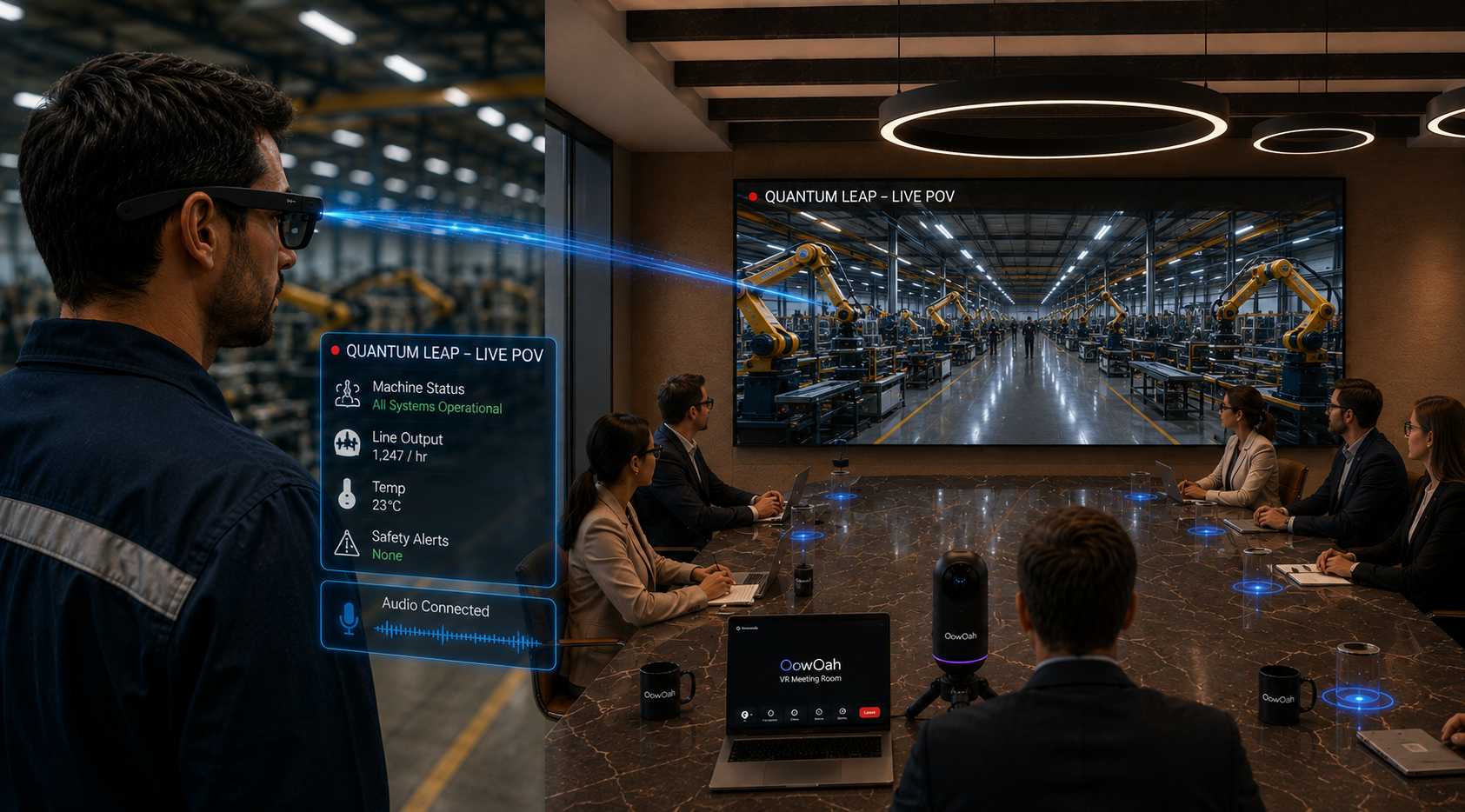
    Quantum Leap can bring a live first-person view of a real object into an OowOah VR Meeting Room. For a prototype review, that creates a way for remote colleagues to see the current physical version while speaking with the person beside it. The useful distinction is between viewing the actual object live and discussing a photograph or drawing. A focused review still needs clear questions, suitable visibility and agreement about what can be assessed remotely. ## Identify the prototype and the review purpose Start by confirming which version is being shown. A prototype may have changed since the latest drawing or report. State what is complete, what is temporary and which questions the meeting is intended to address. Otherwise, a useful observation can become confused with a feature that was never meant to represent the final design.

    An illustrative review might compare the position of visible controls or the arrangement of components. It should not silently become approval of performance characteristics that require separate testing. Defining the purpose helps the team direct attention to what the live view can genuinely contribute rather than asking it to answer every project question. ## Give the remote group a clear overview first Before moving to details, let viewers understand the object, its surroundings and the orientation of the person showing it. Name the front, back or relevant side where helpful. A close view without context can make a simple feature difficult to place. Establishing that reference reduces repeated requests to work out what everyone is looking at.

    Quantum Leap places the real-world view within the virtual meeting environment, for example on a shared screen. It is not the same as giving each viewer an independent interactive model. The group should coordinate what it asks the on-location person to show, rather than assume everybody can select a different physical viewpoint simultaneously. ## Ask one question at a time Several remote experts speaking at once can make the review difficult to conduct. Use a facilitator or an agreed order for questions. Give the person on location time to reposition safely and confirm that the requested detail is visible before the next question begins. Clear communication can matter as much as the camera picture.

    Use identifiable references such as the labelled connector or the upper section of the panel. A request to show that part again may be obvious to one observer and unclear to the person holding the viewpoint. Repeat or refine the reference if needed rather than treating uncertainty as a lack of cooperation. ## Separate observations from tests and approvals A live image can show an arrangement or visible condition. It does not automatically establish a precise dimension, material property or test result. If the review requires another measurement or a specialist assessment, record that need. Treat the stream as a source of shared visual context within the wider development process.

    The on-location person remains responsible for following the site's procedures and the agreed demonstration plan. A remote request should not cause them to handle equipment or change conditions outside that plan. The point is to improve the discussion, not to make a camera view a substitute for appropriate working arrangements. ## Turn the review into a useful next step Summarise what the group saw, what remains uncertain and which action belongs to whom. Identify the prototype version in the record. This helps prevent a later conversation from attributing an observation to a different object or stage of development. Decide whether another live review, a document update or an in-person task is the appropriate follow-up.

    Explore OowOah's Quantum Leap information and discuss your intended prototype review before planning a demonstration. The strongest use is a bounded task where seeing the real object together can answer a meaningful question.

    Explore the next step

    What Should You Show First During a Quantum Leap Equipment Review?

    See how the shared discussion environment works in OowOah VR Meeting Rooms, then describe your intended live-viewing task when enquiring.

    Discuss your plans through OowOah’s contact page or email info@oowoah.com.

  • What Should You Put on the Shared Screen Before a VR Decision Meeting?

    What Should You Put on the Shared Screen Before a VR Decision Meeting?

    Before a VR decision meeting, put the decision itself on the shared screen: what needs to be agreed, which options are being considered and what information matters. A long presentation is not always the best opening. A concise starting view helps participants understand why they are there and how the discussion will lead to a result. In OowOah VR Meeting Rooms, the presentation screen supports that shared reference point. ## State the decision in one understandable sentence Write a question that the meeting can realistically answer. An imagined project discussion might need to choose which of two proposals should move into a more detailed review. That is clearer than a heading such as project update, which gives little indication of what people are expected to contribute or agree.

    Keep the wording within the group's authority. A team may be able to recommend an option without formally approving expenditure or a contract. Identify that distinction at the start. Participants can then evaluate the appropriate question rather than leave believing that a recommendation has become a final authorisation. ## Show the options without overcrowding the view Use short labels and consistent information for each option. A crowded screen can turn a decision meeting into a reading exercise, especially when people are seeing the material for the first time. Detailed documents can support the discussion, but the opening view should establish the structure rather than reproduce every page.

    Check the actual material through the presentation process before the meeting. A slide that looks comfortable on a desktop monitor may need adjustment for the view participants use in the headset. Use readable text, clear contrast and an arrangement that does not require constant searching across tiny details. Ask a tester what is genuinely easy to follow. ## Identify the evidence and its limits List the key facts that support the decision, along with the version or date where relevant. Distinguish confirmed information from an estimate or an assumption. This can prevent a discussion from drifting towards false certainty simply because a figure appears in a polished diagram. The screen should make the evidence easier to question, not harder.

    If essential information is missing, state the gap clearly. The group may still be able to narrow the options or assign follow-up work. That is a valid outcome when the meeting has been honest about its limits. Concealing the gap usually creates a less useful conversation and more work afterwards. ## Give participants a route into the discussion A short agenda can explain when people should ask clarification questions, compare the options and agree the next step. This helps first-time VR participants concentrate on the task without also trying to infer the meeting's social rules. A named facilitator can keep the structure moving and make space for different contributions.

    Allow people time to look at the screen before asking for a response. Describe the part you are discussing and summarise important changes aloud. A shared room does not mean every participant automatically directs their attention to the same place at the same moment. Clear references keep the group together. ## Leave the final view ready for a summary At the end, return to the decision question and state what has changed. Confirm the conclusion, any conditions and the next action owner. If the group has not reached a decision, identify exactly what is needed to make one possible. This turns the screen into a useful record of progress rather than another collection of slides.

    OowOah's meeting-room page explains its current presentation and note-taking features. Use it to assess how your material could fit, then prepare the first screen around the actual outcome your group needs. The most useful opening is often the clearest one.

    Explore the next step

    How Do You Turn a VR Workshop into a Clear Decision Record?

    For a project review involving a real location, explore Quantum Leap’s first-person viewing approach alongside the meeting-room information.

    Discuss your plans through OowOah’s contact page or email info@oowoah.com.
  • How Can a Live VR Fan Event Welcome People Who Are New to VR?

    How Can a Live VR Fan Event Welcome People Who Are New to VR?

    A Live VR fan event can be easier to join when newcomers understand the viewing format before the performance starts. An interested fan may know the artist well while being unfamiliar with a headset or a VR event account. Clear preparation helps separate those two things. OowOah Live VR is designed around remote attendance at a real event, so the welcome should explain what viewers will experience and how they should prepare. ## Describe the experience accurately Explain that the audience will watch a real venue through immersive 360° viewing, using a compatible headset. It is not automatically a game, an avatar meet-and-greet or a chance to move freely through every part of the venue. Those are different experiences and should not be implied by an enthusiastic event description.

    A fan invitation can still be warm and exciting. Describe the performance, conversation or occasion that makes the event worth attending. Then add the practical viewing requirements clearly. The artist remains the reason people want to come, while accurate information helps them judge whether the format suits their equipment and expectations. ## Give preparation its own message Do not hide joining instructions inside a long promotional paragraph. Provide a concise preparation message with the correct event details and the official viewing guide. Ask people to use the account and access instructions supplied for their booking. Avoid encouraging shared logins or assuming that a friend's ticket provides the same access.

    OowOah's viewing information identifies Meta Quest 3 and 3S requirements and the public app route when available. Direct fans to the current guide rather than copying an old installation description into every announcement. If availability or arrangements change, one official reference is easier to keep accurate than several conflicting sets of instructions. ## Welcome the remote audience at the beginning A short spoken greeting can help headset viewers understand that they are part of the intended audience. Explain the programme, likely pauses and how the event will end. If there is an advertised way to contribute a question, describe that specific route. Do not suggest that every viewer can speak directly into the room unless the event genuinely offers that arrangement.

    Keep the greeting brief enough to suit the physical audience as well. An inclusive opening does not need two separate shows. It simply acknowledges who is watching and provides information that would otherwise be obvious only to people sitting in the venue with a printed programme. ## Help people follow unfamiliar moments A fan may recognise the performer but not the venue or the people joining them on stage. Introduce guests clearly and describe a change of activity aloud. Avoid relying entirely on a visual gesture or an announcement that the stream cannot capture properly. The remote experience benefits from deliberate communication.

    Test any material the audience needs to read. A photograph, lyric sheet or projected announcement may be visible in the room without being legible through the camera view. Decide which details need another agreed route and describe that route accurately. Attention to these ordinary moments can make a first VR event feel more understandable. ## Invite feedback about the experience Afterwards, ask a few practical questions about joining, following the programme and understanding the format. Distinguish a problem with the event information from a technical issue or a personal preference. That gives organisers a clearer basis for improving another event than a single general satisfaction question.

    Explore OowOah's Live VR event and viewing pages for current information. This article describes how an organiser could welcome fans; it does not announce a particular artist appearance. A thoughtful introduction helps the audience concentrate on the occasion they came to enjoy rather than wonder how the experience works.

    Explore the next step

    What Should a Speaker Say at the Start of a Live VR Session?

    For current audience preparation and supported viewing requirements, read OowOah’s viewing guide. Explore Live VR event information for published event details as they become available.

    Discuss your plans through OowOah’s contact page or email info@oowoah.com.
  • What Should You Show First During a Quantum Leap Equipment Review?

    What Should You Show First During a Quantum Leap Equipment Review?

    The first view in a remote equipment review should establish context before detail. Show which item is being discussed, where the relevant area sits and what the meeting is meant to clarify. Quantum Leap brings a live first-person view into an OowOah VR Meeting Room, giving the remote group a shared reference. That view becomes easier to use when the person on location and the observers agree a clear starting point. ## Confirm the equipment identity Begin with the description or identifier that the team uses in its records. If there are several similar items, check which one is being shown. A clear identifier can prevent a remote observer from discussing the wrong manual, previous report or configuration. The first useful information may therefore be a name or label rather than a dramatic close-up.

    Avoid displaying information that does not belong in the meeting. The host and on-location person should understand what the intended audience is allowed to see. A review can be informative without exposing unrelated screens, documents or activity simply because they happen to be in the camera's surroundings. ## Establish the wider view Let the remote group understand the orientation and visible arrangement before focusing on one component. Explain which side or area they are seeing. This gives later questions a common vocabulary. A close-up of a small detail becomes much more useful when observers know how it relates to the overall item.

    In an illustrative review of a product display, the person on location could show the complete unit, identify the relevant panel and then move to a particular feature. That sequence is easier to follow than beginning with a detail that has no clear location. The example describes presentation order rather than a procedure for operating any equipment. ## State the question that the view should answer Explain whether the review concerns a visible condition, an arrangement or another clearly defined observation. A broad invitation to inspect everything can create a long conversation without a result. A bounded question helps the group decide what additional view or information would make a difference.

    The live stream does not replace every form of inspection or measurement. If a required detail cannot be seen clearly, say so and identify another way to obtain it. A meeting is more useful when uncertainty remains explicit than when participants feel pressure to reach a conclusion from an inadequate image. ## Keep movement and communication manageable Ask observers to make requests one at a time. Confirm the requested area before changing the viewpoint. The person on location should be free to pause or decline a request that is unsuitable for their circumstances or site arrangements. Remote participants do not have the full physical context merely because they can see a live image.

    Avoid rushing between several details. A stable, understandable view is usually more useful than a rapid tour. The facilitator can summarise what has been shown and ask whether the group has the information needed before continuing. This reduces repeated movement and keeps the review centred on its purpose. ## Close the loop before leaving the first item Read back the observation and the next step. If the group needs another document, image or specialist check, record that separately from what the live review established. Name the owner and the relevant equipment identifier so follow-up information can be matched to the right discussion later.

    Explore Quantum Leap through OowOah's current product page, then describe the kind of equipment review you want to try. A useful first view answers the basic question of what everyone is looking at. Once that shared understanding exists, the more detailed conversation can begin with much less confusion.

    Explore the next step

    How Can a Remote Observer Ask Clearer Questions During a First-Person Stream?

    See how the shared discussion environment works in OowOah VR Meeting Rooms, then describe your intended live-viewing task when enquiring.

    Discuss your plans through OowOah’s contact page or email info@oowoah.com.